
Client conversion is the most vital aspect of growing any business. However, performing it manually is a time-consuming exercise that could deprive you of opportunities. GoHighLevel Automate features rescue you at such times. It is a potent CRM system that converts your leads into clients effortlessly.
Let us consider how you can automate your whole client conversion process with GoHighLevel.
Table of Content
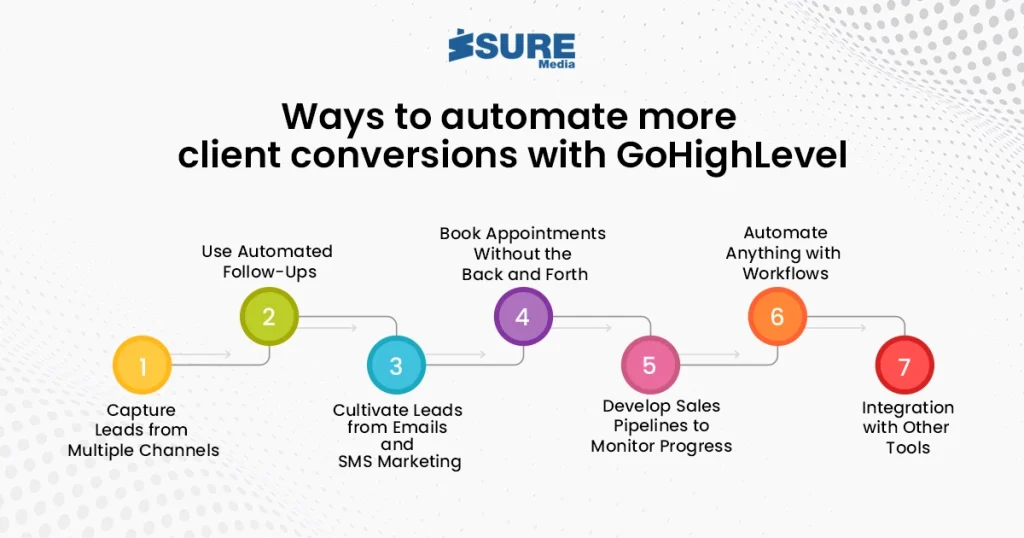
Ways to automate more client conversions with GHL
Here are some of the common ways to get more client conversions via the channel of GoHighLevel.
1. Capture Leads from Multiple Channels
GoHighLevel allows you to capture leads from websites, landing pages, social media, or even SMS. You can create stunning funnels using its drag-and-drop builder. The system automatically saves a lead’s details the moment they fill out a form.
Why it matters:
You won’t miss a single lead, and everything gets saved in one location.
2. Use Automated Follow-Ups
The most prevalent cause of lost leads is not following up. GoHighLevel Automate features correct this with intelligent workflows. You can set up automatic follow-up emails, messages, or calls based on user activity.
Example:
If someone completes a form but never schedules a call, the site can automatically send a reminder message the following day.
3. Cultivate Leads from Emails and SMS Marketing
Once you have a lead in your pipeline, you can begin establishing trust. GoHighLevel allows you to send targeted email and SMS campaigns easily. The messages may be scheduled as well as personalized.
Pro Tip:
Utilize a series of value-rich emails to warm up cold prospects. Allow the system to do the hard work while you concentrate on closing sales.
4. Book Appointments Without the Back and Forth
The combined calendar application enables customers to schedule appointments without middlemen. You can integrate it into your website, emails, or SMS. GoHighLevel Automate features, when an appointment is booked, send instant confirmations and reminders.
This will assist you:
Prevent no-shows and minimize time spent on manual scheduling.
5. Develop Sales Pipelines to Monitor Progress
In GoHighLevel, you can design visual pipelines to view where all your leads are. You can drag leads from one stage to the next. Automations can also trigger when leads are transferred between stages.
For instance:
When a lead is converted to “Interested,” your system may send a thank-you alert or alert your sales reps.
6. Automate Anything with Workflows
Workflows are the core of GoHighLevel Automate‘s power. You can design step-by-step automation paths based on activities such as:
- Form submission
- Link click
- Missed call
- Appointment scheduling
Every action can have a chain of reactions—messages, notifications, task assignments, etc.
7. Integration with Other Tools
GoHighLevel integrates seamlessly with tools like Stripe, Zoom, Facebook, and Google. This enables you to manage meetings, payments, and ads in a single place. All of these can be integrated into automated workflows.
Here’s a quick reveiw for all the steps discussed earlier.
Conclusion
A completely integrated system that operates while you sleep. The biggest advantage of employing GoHighLevel Automate is time saving with more client conversions. You will not have to chase leads manually or follow them up.
All this will be taken care of by the system. By creating automation in GoHighLevel, you are able to: Respond to leads immediately Guide them with suitable messages Monitor them throughout the sales process Turn them into repeat customers.
If you’re looking to grow your business and close more deals, GoHighLevel Automate is what you need.
Click on the following button to get help with GoHighLevel automate.
You can also click on the following social media links to connect with us.